
Updated 4 October 2026. This post is from February 2026 and names GPT-4o, Llama 3.1, Qwen 2.5 as current. The method and the advice still hold; today you would run it with:
- Gemma 4: use these small, efficient models for high-speed local extraction and summarisation tasks.
- Llama 4 Scout / Maverick: deploy these larger, more capable versions when your use cases require deeper reasoning.
- DeepSeek V4: integrate this model for complex coding or heavy data processing on your own hardware.
Most businesses think deploying AI means signing up for OpenAI’s API and hoping for the best. There is a better way: run it on your own hardware.
flowchart LR
    A["1. Assessment\n1-2 days"] --> B["2. Hardware\nSelection\n2-3 days"]
    B --> C["3. Model\nSelection\n3-5 days"]
    C --> D["4. Deployment\n2-4 weeks"]
    D --> E["5. Monitoring\nOngoing"]
    A -.-> A1["Use case ID\nInfrastructure eval"]
    B -.-> B1["VRAM/RAM sizing\nDevice comparison"]
    C -.-> C1["Benchmarking\nLicense evaluation"]
    D -.-> D1["Installation + integration\nLoad testing"]
    E -.-> E1["Dashboards + alerts\nPeriodic fine-tuning"]
    style A fill:#DBEAFE,stroke:#2563EB
    style B fill:#DBEAFE,stroke:#2563EB
    style C fill:#FEF3C7,stroke:#F5A623
    style D fill:#FEF3C7,stroke:#F5A623
style E fill:#D1FAE5,stroke:#059669Why local AI makes sense in 2026
Three things changed in the last 18 months:
-
Small language models got good enough. Open models like Llama 3.1 (8B), Qwen 2.5 and Phi-4 handle routine business tasks such as drafting, summarising and extracting data well enough for many teams, and the smallest run on a EUR 250 board. Test them on your own documents before deciding.
-
Hardware got cheap. NVIDIA’s Jetson Orin Nano Super developer kit sells for USD 249 and is rated at 67 sparse TOPS; the previous 40 TOPS kit was USD 499 (NVIDIA).
-
Regulation caught up. The EU AI Act and GDPR enforcement mean European companies need to control where their data goes. Local AI is the cleanest solution.
The 5-step deployment process
Step 1: Identify your top 3 use cases
Don’t start with technology. Start with pain:
- Documents processed manually (contracts, invoices, emails)
- Repetitive questions (customer support, internal help desk)
- Weekly reports generated by hand
Step 2: Choose your hardware
| Device | RAM | Price | Best for |
|---|---|---|---|
| NVIDIA Jetson Orin Nano | 8 GB | EUR 250 | Single agent, entry point |
| Intel NUC 13 Pro | 16 GB | EUR 400 | Small office, multi-task |
| Mac Mini M4 | 16-24 GB | from EUR 719 | Department-wide, multi-model |
Step 3: Calculate your ROI
Cloud AI costs grow with every request; local AI is mostly a one-time hardware cost plus electricity. Which is cheaper depends on your volume, so do the arithmetic with your own numbers: requests per month × tokens per request × the provider’s price, against hardware plus electricity. The worked example below shows how, and our break-even guide has a script that does it for you.
Step 4: Secure funding
European businesses have access to grants and loans that can cover part of the deployment cost:
- Kit Digital (Spain): Up to EUR 12,000 direct subsidy
- IVACE INNOVA-CV (Valencia): Up to 45% project funding
- ENISA (Spain): participative loans for SMEs and start-ups, without personal guarantees (ENISA)
- Horizon Europe / EIC Accelerator: grants for deep-tech innovation, far beyond a typical local-AI project
Step 5: Deploy in 4 phases
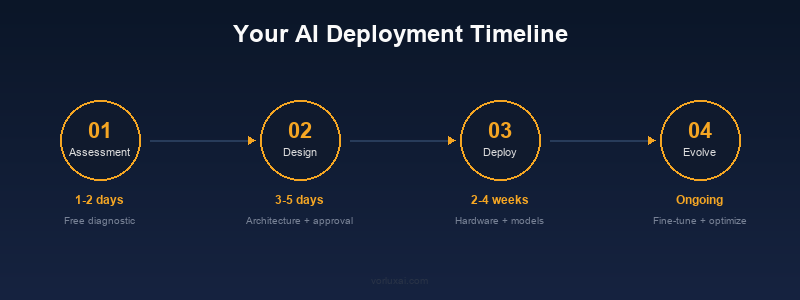
- Assessment (1-2 days): Infrastructure evaluation, use case identification
- Architecture (3-5 days): Solution design, model selection, integration planning
- Deployment (2-4 weeks): Hardware installation, model configuration, system connection
- Evolution (ongoing): Monitoring, fine-tuning, model updates
Quick Start: Your First Local AI in 5 Minutes
Once you have your hardware, getting started is surprisingly simple:
# 1. Install Ollama (macOS / Linux)
curl -fsSL https://ollama.com/install.sh | sh

# 2. Pull a model (Qwen3 8B — a solid general-purpose choice for SMEs)
ollama pull qwen3:8b

# 3. Test it
curl http://localhost:11434/api/generate -d '{
  "model": "qwen3:8b",
  "prompt": "Draft a professional email declining a vendor proposal politely, mentioning we chose a local solution instead."
}'

# 4. Verify it's running locally (no data leaves your machine)
ollama list
That’s it: you now have a capable open model running entirely on your hardware, with no API costs and full data privacy.
Cost comparison: Local vs Cloud over 12 months
The most common question businesses ask is “how much will this actually cost?” Here is a worked example for a small team: 500 requests a day, each with 700 input and 300 output tokens, so 15,000 requests a month. Cloud prices are OpenAI’s published rates for these models (GPT-4o: USD 2.50 per million input tokens and USD 10 per million output; GPT-4o mini: USD 0.15 and USD 0.60).
| Cloud (GPT-4o API) | Cloud (GPT-4o mini) | Local (Mac Mini M4) | |
|---|---|---|---|
| Setup cost | 0 | 0 | from EUR 719 (hardware) |
| Per month | about USD 71 | about USD 4 | at most about EUR 9 (electricity) |
| 12-month total | about USD 855 | about USD 51 | at most about EUR 830 |
| Data privacy | Third-party processing | Third-party processing | Full control |
| Offline capability | No | No | Yes |
Arithmetic: GPT-4o is 10.5 million input tokens × 2.50 + 4.5 million output tokens × 10 = USD 71.25 a month. Local electricity assumes the Mac mini running flat out at its 65 W maximum (Apple) at EUR 0.20 per kWh; real use is lower.
At this volume the honest answer is that cost alone does not decide it: a local machine costs roughly what a year of GPT-4o would, and a small cloud model is cheaper still. The case for local at this size is data control, offline operation and a fixed cost that does not grow with use. At higher volumes, or with larger prompts such as long documents, the arithmetic moves in favour of local hardware.
For businesses processing sensitive documents (legal, medical, financial), the GDPR compliance benefit alone often justifies the switch, regardless of cost savings.
What does it cost?
| Service | Price |
|---|---|
| AI Assessment | Free (15 min) |
| Custom Deployment | Project-based + hardware |
| Enterprise & Government | Custom project |
| Monthly Support | Managed support (optional) |
GDPR compliance built in
When AI runs on your hardware:
- Data never leaves your network
- No third-party data processing agreements needed
- Full audit trail on your own systems
- Compliant with EU AI Act by design
For a detailed cost breakdown comparing cloud and local approaches, see our cloud vs local AI cost analysis.
Next step
We offer a free 15-minute assessment. No commitment. We analyze your infrastructure and tell you if local AI makes sense for your business.
Sources: Ollama · Apple Mac Mini M4 Specs
VORLUX AI deploys artificial intelligence directly on your infrastructure. No cloud, no latency, no data leaks. From Valencia, Spain.
Next steps
- Identify your top three business use cases.
- Compare the costs of local versus cloud deployment.
- Review your hardware for GDPR and EU AI Act compliance.
- Read about connecting AI agents to your business tools.
Related reading
- n8n + MCP: Connect Your AI Agents to Any Business Tool
- ComfyUI Batch Image Generation: Create 100 Product Images in Minutes
- ComfyUI ControlNet Tutorial: Guided Image Generation with Edge Detection
Work with us
We size the model and the machine by measuring, not by guessing. If you want to see your own task running on real hardware, book a 15-minute call or see how we work in consulting.